
It’s been a little over two months now since Windows 11 officially launched. The early adopters have already hopped on board, but many companies take a wait-and-see approach when it comes to major operating system upgrades.
This is a wise decision as it ensures you’re not going to run into problems with a buggy initial release, which can cause problems and costly downtime.
A company’s technology infrastructure is vital to business continuity, so any disruptions can impact the bottom line. However, companies also want to continually optimize performance and efficiency, and sometimes waiting too long to upgrade can cause your team to lag behind.
One other danger of holding onto an older operating system for too long is that if you’re still running your PCs on an outdated OS when it hits the end of life and loses security support, your network security is put at high risk.
So, what does the Windows 11 upgrade look like? Should you wait longer, or is it okay to upgrade now?
In brief, this has been a very successful rollout without only minor bugs reported, many of which have already been resolved.
We’ll go through what bugs still exist, what problems you might run into, and what features may encourage you to plan a full-office upgrade to Windows 11 as soon as possible.
A Few Bugs & One Unfinished app
While most of the new features in Windows 11 are great and well-received, there is one new feature in particular that looks like it hasn’t been finished quite yet.
The Widgets feature that allows you to click open a widgets panel from your taskbar only has a few items you can add, and the email app has trouble properly connecting to Outlook email.
Likely Microsoft will improve this feature in the near future, but don’t expect too much from it right now.
The few bugs that exist mainly have to do with compatibility between Windows 11 and specific software. Two of the compatibility issues noted as still open are:
- Compatibility with Oracle VirtualBox
- Compatibility with Smart Sound Technology drivers
Benefits of Upgrading to Windows 11
Snap Layouts for Easy Multi-Windows Work
If you upgrade for only one productivity feature, then this would be the one. Snap layouts is intuitive and simple to use. It allows you to hover over your maximize icon at the top of the window and choose from several pre-set layouts of between 2-4 windows.
Your windows snap into an optimized view where you can reach your scrollbars and menus.
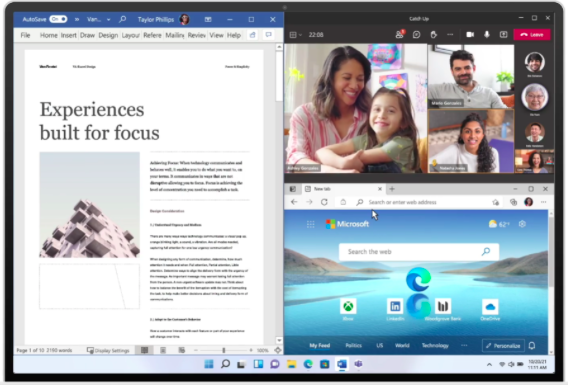
Snap Layouts in Windows 11
Native Microsoft Teams Integration
Microsoft Teams is natively integrated with an icon on the taskbar in Windows 11 and it allows you to quickly call, message, or video chat with contacts both inside and outside your company.
You don’t have to open the Teams apps to use it, shaving off valuable time and making connections more fluid. It also allows you to send a text message to any cell phone number and receive messages back. This is very handy if you hate typing on a small smartphone screen. The type of cell phone you use doesn’t matter as you’re texting from MS Teams itself.
Less Cluttered Interface
The Start Menu has become more streamlined in Windows 11, making it easier to use and less cluttered. One thing that users will need to adapt to is that the Windows icon for the Start Menu is now grouped with the other icons in the middle of the taskbar instead of on the far left.
The Zen-like look of Windows 11 is one of the features being touted in reviews as boosting user performance.
Not a Huge Learning Curve for Users
Some Windows OS upgrades in the past have been quite a dramatic change for users, requiring weeks for them to relearn how to get around their Windows environment. Windows 11 is not like that.
This is a smaller upgrade, that is focused mainly on productivity features and decluttering the interface. The experience and how you get around the desktop are very much the same, so users will not have much of a learning curve at all.
Even using the new features like snap layouts and Teams doesn’t take a lot of instruction. Both features are simple to use and very intuitive. This is a plus for businesses because it means less potential for a drop in productivity as users upgrade and switch over to a new Windows interface.
Plan a Successful Upgrade to Windows 11 with Onsite Techs
Onsite Techs of Rhode Island can help your business roll out a smooth transition to Windows 11 to boost team productivity and mitigate and downtime.
Contact us today to schedule a consultation at 401-773-7766 or book a video call now.

